After my successful debrand your phone for about a £5 (33,618 hits, 104 comments) and then unbrand your mobile for free (11,680 hits, 161 comments) posts. I now bring you the easiest way to de-brand your phone for free.
No more looking for files in folders which are about 41 bytes, no more trying to get the Box.com to download the files, no more running SEUS fifteen times, just 8 simple steps.
But before I begin, here are the usual disclaimers:
Whilst I have successfully converted several Vodafone W960i into unbranded ones, I can’t guarantee that the same will happen to you. If you’re not 100% confident then DON’T do it. All actions are taken at your own risk! Yada yada ya…
There seem to be some issues with the M600, please read the comments first and then judge for yourself if you want to go ahead!
The things you will need to successfully remove the network customisations from your phone are:
- A UIQ3 phone (W960i, P1i, P990i, M600i, W950i)
- XS++ 3.1 (mirror)
- Sony Ericsson Update Service
- Sony Ericsson Data Cable (should have come in the box)
- A computer running Windows XP (Vista may work)
- Perform a back-up of your phone via the PC Suite (or however you prefer), as you are going to wipe all of the phones C drive.
- Run the Sony Ericsson Update Service (SEUS), click on the icons matching your phone, when prompted pull the battery out and put it back in, when prompted plug the cable into your phone whilst holding down C (this is either the letter C on the keyboard, the Cancel button or even the @ internet button). Once it’s found your phone it’ll will either prompt you to update the firmware or inform you that you have the latest. Either way, quit SEUS without doing anything else. (This will force your PC to find the drivers required for your phone)
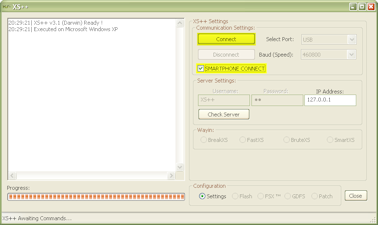
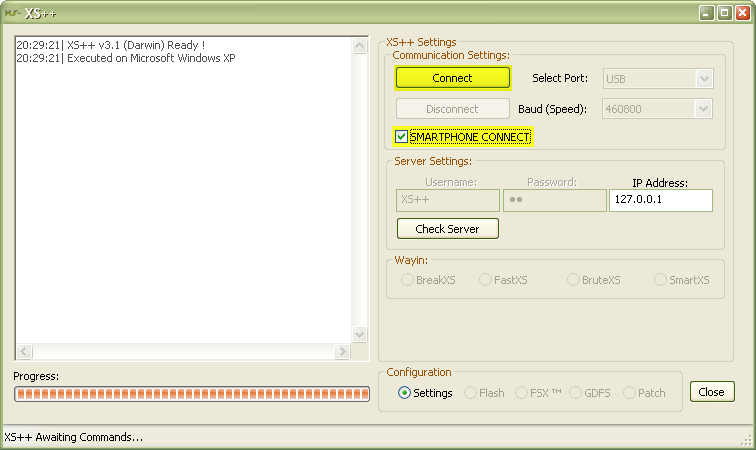
- Run XS++, click on the SMARTPHONE CONNECT box, and press Connect. The box on the left will tell you what to do, but it’ll be similar to step 2.
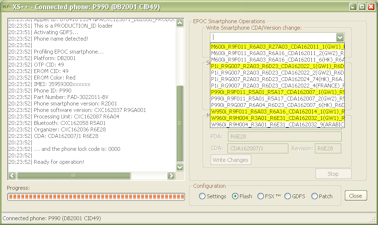
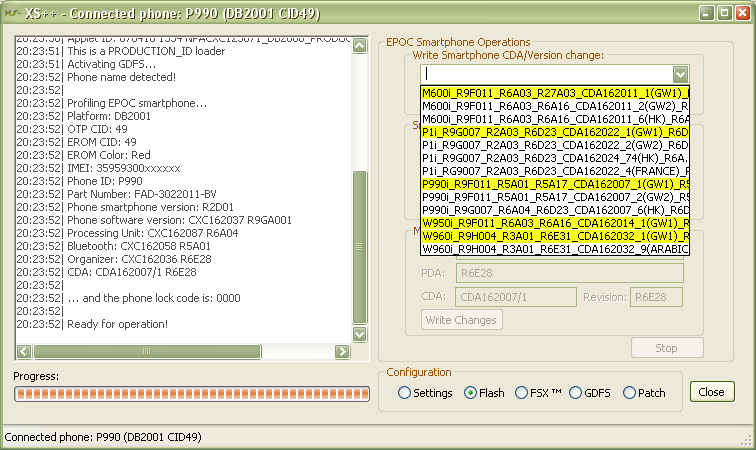
- Once connected you now need to select the new CDA for your phone:
W960 – CDA 162032/1
P1 – CDA 162022/1
P990 – CDA 162007/1
M600 – CDA 162011/1
W950 – CDA 162014/1
and hit Run Script. (They all have GW1 in the script name, however you can choose any of the others, but I recommend the Generic World 1 scripts)
- You can now close XS++, I recommend that you don’t touch anything else in XS++!
- Now run SEUS again, this time do the update on your phone.
- Boot up your phone to the Sony Ericsson or Walkman startup screens. Goodbye Vodafone, Orange or o2 🙂
- Restore the backup of your phone
See wasn’t that easy.
As before, feel free to put questions in the comment box.
And if you feel like it you can always send a donation via PayPal 😉
Ok, doing it now, idk man, i think it still has that problem, cuz this is not a SIM unlocker right?
Nope, still the same problem, i get a message: Please insert the right SIM card.
I had Sweden 3 (three)
This only unbrands a phone, it does not remove the SIM lock. The cheapest way I’ve found so far is to pay your network for the code.
When you say to do a backup do u mean to backup things like msgs, pics, contacts etc or do you have to backup all the software etc?
Basically does debranding wipe the phone or just wipe personal stuff like contacts etc
Thanks (ps very good guide, will be trying it soon)
Irfan Pathan, it’s going to wipe everything from the C drive, contacts, pictures, calendar entries, games, software, ringtones…
You should be fine using the PC Suite backup and restore program, others however prefer to copy the contacts to the memory card and start a fresh.
just ordered an o2 w960 (england) and will post in a few days about any troubles i may come across for any one just stumbling onto this site;)
thanks. Very useful and work just breazy. finally got my danish M600i unbranded. much appreciated!!! 🙂
Thanks a lot for the free tip !
It did work with my french Orange P990i !
I was a bit afraid when the process was running, but
it went atout free from any brand !
Ca a bien marche malgres quelques sueurs froides durand le flashage. Fini l’ecran d’acceuil de la marque orange, vive Sony !
Merci à toi pour le super plan gratuit !
JR (Paris, France)
im about to try this on my w960 that vodafone branded. im a bit afraid but willing to take the risk…. this works right? i’ve done my w810 using davinci hence the reason im thinking about doin this. someone who have done it add me on messenger pleaseee!!! [email protected] THANKS in advance
🙂 absolutely fantastic….. Goodbye Vodaphone LIVE!!
Hello Sony Walkman.
Thanks a million!
hi im trying this with an o2 w960 but when i try to exit its says that i cant, should i end the program using the control panel?
chad, I’ve done two UK Vodafone W960i so far, and all worked a charm. It’s easier than Davinci, as SEUS will do the firmware bit for you.
anon, exit what?
thanks Ryan, when i do it i will let u kno how it went..
22:47:18| XS++ v3.1 (Darwin) Ready !
22:47:18| Executed on Microsoft Windows XP
22:48:13| Error: Server not found!
22:48:16|
22:48:16| Attempting to open the interface…
22:48:16|
22:48:16| TURN OFF PHONE!
22:48:16| Hold ‘C’ button on phone and connect phone NOW.
22:48:16| You have 30 seconds…
22:48:16|
22:48:46| Error: Cannot open phone communication port
22:48:48| Disconnected… Unplug the phone
22:49:11|
22:49:11| Attempting to open the interface…
22:49:11|
22:49:11| TURN OFF PHONE!
22:49:11| Hold ‘C’ button on phone and connect phone NOW.
22:49:11| You have 30 seconds…
22:49:11|
22:49:20| Disconnected… Unplug the phone
22:50:19|
22:50:19| Attempting to open the interface…
22:50:19|
22:50:19| TURN OFF PHONE!
22:50:19| Hold ‘C’ button on phone and connect phone NOW.
22:50:19| You have 30 seconds…
22:50:19|
22:50:49| Error: Cannot open phone communication port
22:50:51| Disconnected… Unplug the phone
22:51:08|
22:51:08| Attempting to open the interface…
22:51:08|
22:51:08| TURN OFF PHONE!
22:51:08| Hold ‘C’ button on phone and connect phone NOW
22:51:08| You have 30 seconds…
22:51:08|
22:51:39| Error: Cannot open phone communication port
22:51:41| Disconnected… Unplug the phone
22:52:45| Shutting down…
poop, have you got “Smartphone connect” ticked?
oh sorry, anon again, i mean exit seus, when i get to the screen tellin me i have the most recent firmware i try to exit but it says i cant.:( after i get an answer il try it with my phone
anon if it SEUS being run for the first time, just kill it in task manager if it’s not loading. You won’t need to run it again as by now the drivers should be successfully installed on your machine.
If it’s doing it after you’ve used XS++, be carefull. If you are at the “Press to update” you should be fine to stop/kill SEUS, if you are going through the bit where you are downloading the software, stop/kill and uninstall, delete all the files in the SEUS folder in the program files folder of your computer, reinstall, and try again. If you are on the bit where it’s copying the data to your phone, leave it as long as possible. If it’s at 97+% then try booting your phone, otherwise do SEUS again (maybe on a second machine).
Fantastic!!! Just said “SEE YOU LATER” to the old clunky Vodafone environment on my M600i. It’s so simple!! Thanks heaps!! Had to do something after Vodafone NZ couldn’t do anything to help me…
Worked fine on my “Digicel Jamaica” branded p990i, now I have Generic World 1…. with the latest firmware of course. 😉 with the Digicel jamaica region (90) it wasn’t possible.
Just works great!
Many thanks man!
Cheers
Narcis from Barcelona (Catalonia is not spain!)
Tried it on UK orange p990i worked a TREAT!!
Thanks!!
Excellent. Worked well w/o any problems.
Good bye to Vodafone logo.
Thanks a lot!
odafone debranding worked great with the GW1 backup. No more Vodafone problematic software
My p990i is locked in Smart Telecoms in Philippines? Can this program disable the network lock?
Ivan, this only unbrands a phone, it does not remove the SIM lock. The cheapest way I’ve found so far is to pay your network for the code.
It worked for me! Thanks!
Bye bye TIM Italy slow brand.
Now my m600 is faster than ever
Bonjour
Good morning
I do it this morning on P990i/Orange French
Super sur mon P990i / Orange France
Many thanks
Merci encore
Bye
Salut
Thanks for posting this tutorial, I’ve debranded my P990 with your solution, big thanks to you! 8)
it’s not working with my o2-branded W950i… damn it.
XS++ cannot detect the phone. I have checked SMARTPHONE CONNECT:
17:08:12| Executing SEMC Smartphone Operations!
17:08:12| Please hold boot key (‘@’ or ‘C’) and connect device…
***after waiting and holdin C too long i click disconnect…***
17:08:46| Disconnected… Unplug the phone
I also used to connect to XS++ when the phone was on, but then it says:
17:16:20| Master Port detected: COM3
17:16:20| Slave Port detected: COM4
17:16:20| Opening Port!
17:16:20| Init Master Failed!
and in the log I found this, didn’t see it when it happened:
17:09:06| Sorry, your phone is NOT SUPPORTED
17:09:06| Sendinging shutdown signal to phone…
17:09:08| Shutting down…
thanks for any help!
smail, have you run SEUS to ensure that the drivers are installed?
:lol:8)
Just done this on my Vodafone UK branded W960i and it worked a treat , Yippe… I’m non technical just followed the instructions , simple.
should i back up my gdfs in case it goes wrong?
it doesnt matter, it didnt go wrong, thanks loads for my new w960 without any of that o2 junk!!!
Thanks for the guide.
Worked fine on my UK Orange P990i, even using WinXP running in VMWare on Ubuntu LInux.
Phone now much faster and easier to use, as expected, plus much more recent firmware.
my m600i now gives an error
NO ORGINISER SOFTWARE SCCRING: 442
I cant find any info on the error. any tips?
mike run XS++ and make sure that you have the correct M600 file selected. Then you’ll need to uninstall SEUS, find the SEUS folder in Program Files and delete EVERYTHING, then reinstall SEUS and download the firmware again. If you continue to have problems, use another computer with SEUS.
I did everything once more.
in XS++ i selected
M600i_R9F011_R6A03_R27A03_CDA162011_1(GW1)_R6A13.gdfs
It completed with no errors.
I installed and ran SEUS on another computer.
same problem, it says I have the most recent update and doesnt do anything.
This is depressing.
mike, you should be given the option to install the firmware anyway, if you continue to have problems you’ll need to go to Sony Ericsson or your network to see if they can use EMMA to flash the phone.
Ill try hooking my computer directly to the modem, or use a computer at someone else’s home. Maybe my firewall is the problem. I told it to pass everything through this morning and its log doesnt show its blocking anything when I do the update but I am not getting the option to install the firmware, it just says Im up to date.
same thing, no udate avaiable, your phone allready has the current firmware.
the error now is no orginizer software SCCRING 445
its allways fun to toss a few hundred dollars in trash eh?
mike, there really should be the option to flash the phone anyway, as the P990 always comes up as having “new” firmware I can’t test. However you might want to try using XS++ to turn your phone to chinesse / hk, flash it, then turn it back to GW1.
It worked orange w950i as a few says not unlock just debranded your mobile
Man, this is awesome! I’ve had a V800 and I lived the phone, but the vodamized firmware made me nuts…
But with this I can easaly digg my new p990i…
Thanks Man! You Rock!
hey man that was really good i am now well chuffed:):):):):)
yes, i’ve run SEUS directly before.
updated it, and a second (and third) time i quit before reinstalling the current firmware, as step 2 says…
is there anything more i can do?
cheers
…i get PHONE IS NOT SUPPORTED with my W950i…
:):):)Many thanks, just done my w960i vodafone to generic. AWESOME.:):):):):)
Worked a treat for Orange branded P990i. I used Vista, the only difference being I had to kill SEUS in Task Manager. First class tutorial mate, thank you VERY much.
Gaz
Method worked perfectly for the uk orange p990i
no problems at all.
Thanks for the great help
I accidentally updated the firmware of my Australian 3 M600i through SEUS and after changing the phone’s CDA and running SEUS again, it said the phone is already up-to-date and I can’t update the firmware anymore. Please help!
smail, what’s the full debug from XS++ show?
Ashed, there really should be an Update anyway option, although others are reporting that this isn’t appearing with their M600s. Not too sure what else can be done.
Ryan, I posted it earlier, here my XS++ log again:
XS++ cannot detect the phone. I have checked SMARTPHONE CONNECT:
17:08:12| Executing SEMC Smartphone Operations!
17:08:12| Please hold boot key (‘@’ or ‘C’) and connect device…
***after waiting and holdin C too long i click disconnect…***
17:08:46| Disconnected… Unplug the phone
I also used to connect to XS++ when the phone was on, but then it says:
17:16:20| Master Port detected: COM3
17:16:20| Slave Port detected: COM4
17:16:20| Opening Port!
17:16:20| Init Master Failed!
and in the log I found this, didn’t see it when it happened:
17:09:06| Sorry, your phone is NOT SUPPORTED
17:09:06| Sendinging shutdown signal to phone…
17:09:08| Shutting down…
One of the reasons why I want to debrand it is that I get a lot of messages if I want to install apps everytime I unplug the phone from a computer. Cannot get rid of them. Has anyone maybe any other ideas, apart from debranding?
Thanks!
smail, for the install apps issue you will need to use the datacable and your phone in File Transfer mode.
Go to /private/10202dce/ on the phone’s folder, from you PC
You’ll find the installer files (.sis) just delete them and you’re done.
Not sure why XS++ won’t let you debrand the phone though, could try their forums.
Ryan I also have the issue of the updating anyway option not appearing. I am also on Australian 3 like the other person.
One thing I have noticed is that in the phone status screen, the firmware shows as:
Phone:
CXC162037 R9F011
R9EC001
prgCXC162037_CCPU_HE_LL_NI
(cant post long comments?)
it shows as prgCXC162037_CCPU_HE_LL_NI < and there are 5 boxes here like its corrupt or something but this doenst show up in the service menu software screen. Also XS++ doesnt get my bluetooth version but it has all other versions fine
Worked OK on UK “02” P990i.
But did take 3 attempts to get final update to work, and was very slow updating.
Got there in the end.
All WG1 and latest firmware now.
Thanks 🙂
Wonderful. Your instructions were very clear and took me 1 try to debrand my P990 (CDA162007/8).to GW1.
Thanks.
I change the cda on my m600i but SEUS say “no update your phone is up to date”. Now i can’t install french language because the organizer is CXC 162071 R6A16. What can i do to unbrand my m600i and to install french language.
Thank you
I tried with a M600i with Australian Three network.
Followed the instructions exactly, however end up with the message “Your mobile is already up-to-date”, and no option for forced update.
How should I proceed from here?
For stuck M600 users, other than hoping that SEUS will allow you to update, the only other options I know are:
taking your phone to Sony Ericsson service centre and for them to use EMMA;
or to try Davinci Team who charge €20 for a PDA Flash, which includes the actual firmware.
I reflash my “broken” m600i with davinci for 20€ and it works. You should not say in the tittle that the free unbrand is working with m600i. Lot of people on french forum have the same problem.
i finally did it…and it worked… so easy
I have a problem with both of debrand metods on my M600i. Both of metods going to last step and after that SEUS told me that I already have newer version.
What can be a problem. Can anyone know?
For Sasha Petrov. I did have the same problem. The only solution with a m600i is to flash your phone with davinci. It’s not free it’s about 20€. Lot of m600i users are in the same situation. I think it’s because SEUS change few days ago.
http://www.davinciteam.eu/index.html
hi,
works that method also with Vista or do I need XP for this??
pedderson, I don’t know. XS++ should run on Vista, but I’m not certain about SEUS. Neither are that big that trying both won’t hurt.
Does this method still work on an M600i?
Mine is unlocked but vodafone branded, really want it debranded but read that some have been bricked this method, is that still happening?
The phone is UK btw.
Take care. It doesn’t work on a M600i.
🙁
i tried all 3 way. the size checker version, the davinci, and the xs++
non of them works. i just found out, my p600i is a brown version.
any help would be great
23:32:11| Attempting to open the interface…
23:32:50| Disconnected… Unplug the phone
23:34:09|
23:34:09| Attempting to open the interface…
23:34:28| Disconnected… Unplug the phone
23:35:13| Executing SEMC Smartphone Operations!
23:35:13| Please hold boot key (‘@’ or ‘C’) and connect device…
23:36:03| Master Port detected: COM4
23:36:03| Slave Port detected: COM5
23:36:03| Opening Port!
23:36:03| Error: Cannot open phone communication port
23:36:05| Disconnected… Unplug the phone
23:42:59| Executing SEMC Smartphone Operations!
23:42:59| Please hold boot key (‘@’ or ‘C’) and connect device…
23:43:36| Master Port detected: COM4
23:43:36| Slave Port detected: COM5
23:43:37| Opening Port!
23:43:37| Init Master Failed!
😆 Very very happy, great tutorial,I’m beginning to hate orange, they assured me this phone was seamless with my apple mac before I committed to it for 18 months, so far no joy lets have a go now their firmware barring is switched off.
I know I have to moderate emotions on here but they have been just awful about all this… what use is a smart phone that does not sync with your computer? I have been an Orange customer since 1995 and they really haven’t helped at all with the issues, if I could have done this then why didn’t they tell me before? maybe it will sync with my Parrot kit now as well, I will let you know. By the way I did the upgrade on my Girlfriends Vaio, what about all the mac users that don’t have access to a PC?
Thanks again.
Okay, an update… my p990 has just synced for the first time ever with my apple mac, thank you so much, I now have a smart phone after carrying the thing around for over a year!
Martman.
Woohoo, just unbranded a UK P990i with vodafone branding! Worked perfectly!
Thanks
This worked amazing on my SE p990i branded by 3 (three sweden) now its unbranded. Maybe unlocked??
Thanks for this amazing guide!!!!
I’ve just done this on my O2 W960i, I’ve just popped a Vodafone sim into it & it works no problems!:)
Everything worked great. Very easy!!!!!
15min and my P990i was flashed!
2 simple words .. Thank you!!
if you have the above error,
please checked if you are holding the “C” button in your computer rather than the “C” button in your phone?
Please remember you should press the “C” button in your phone.
HI. for some reason the 2,4,5 & (*) keys on my phone is not working… upon turning on my phone i have a lock code.. but the lock code consist of me pressing 2 of these keys to unlock it. i am thinking that it may be a firmware issue.. can some one help me in flashing my phone or giving me a software that can reset my phone’s phone lock code to 0000… PLEASE HELP.
i forgot to include… i wanted to kno if doin this cleans the phone lock code from my phone? please help
Jubari, the method in the post won’t reset the phone lock, however XS++ does display it, and I think there is an option to set it to 0000.
Just run the software and have a look around.
yea i did that…but it says its only for db2020 phones… the w960 is db2001 :(… any other options u have in mind?
Hi again.
I’m trying to use this method that you suggested. I’m already encountering an issue. After I installed SEUS, it just keeps running that animation of the SE logo. It downloaded the necessary files and it didnt say anything else.
What can I do now ?
alex_667 do you use Firefox, as you may need to run Internet Explorer and update Flash. Also check to see if your firewall is blocking it from conecting to the internet. Otherwise try a second computer.
It just hanged for a few minutes. It worked ok.
Debranding 100% complete on a SE P990i. I must admit that I was very scared at the beginning because many people told me that it might get blocked forever. After I ran XS++ and after it said that the operation was successful I suddenly became more optimistic. Then SEUS recognized automatically the update needed and everything worked fine. +1 happy dude here.
Thank you so much for the help!
its important to note that the instructions DO NOT tell you to switch off your phone remove and replace the battery then hold down c while you try to connect XS++ I had to read the XS++ instruction manual to find that point out.
That said it seems to de-brand orange phones fairly well.
Keith thats because the instructions say:
same problem as a few people before me.. SEUS gives out message update is up to date and there is nothing (at least nothing for free) to do about that.. please write if you find a solution..
thanks!
Hi.I debrand my P990i (Orange -Poland) this method. And after this all looking ok.Is possible run demo …but phone say” PLEASE INSERT SIM CARD” …but sim card is inserted!!.I no make a backup before do this debranding procedure because i buy this phone yesterday..but this is no important for this “Please insert Sim Card” right? Guys PLEASE Help…
Thanks
Hats off BOSS. Excellent Post. Thanks a Million.
Hi i’m about to ( tonight ) attempt to unbrand my orange uk m600i, from what ive read as per instructions seems easy, can i just confirm the Xs++ and (mirror) links involve a file download to pc ? Also when you state close Xs++ do you mean teh close option bottom right or the X top right? im ok with pc’s but would liek to get it right 1st time fingers crossed!
🙂
PMRT, the links to XS++ are for either a ZIP or RAR of the XS++ executable.
Close is via either the red cross at the top, or the button in the app.
Only issue is that SEUS seems to believe that there are no longer any updates for the M600. I have heard that Sony Ericsson are fixing this, but have yet to have it confirmed that it works again.
You won’t harm your phone trying to do all the stages and if SEUS doesn’t allow you to install the new firmware, you will only need to try SEUS again once it is fixed.
Hi Ryan
i am stuck – i loaded from my pc suite older version also tried newer direct from SE – pc suite picks up device M600i but when use SEUS it states USB device not recognised tho Suite finds ok?
I removed all other usb items ie printer – mouse etc but no good – i really want to unbrand Orange s/w – i qork for them but to be honest i wish theyd leave s/w alone!!
Hey dude,
Hopefully you will read this, anyway i tried this method and upgraded fine. However the camera crashed the phone everytime i went to use it. So long story short i want to put the vodafone fw back on, but didnt make a backup of my gdfs. Do you have a copy of a vodafone gdfs that i could use please? Or is there another way?
Cheers.
Hobbit sorry I don’t. However I had a P990i on Vodafone which I debranded and it’s worked fine ever since. Have you tried reflashing with SEUS?
Cheers for the reply, yeah i tried reflashing with SEUS, but if i try without xs++ it just errors and wont update. If i use xs++ it just updates and keeps the same world 1 fw.
Thanks so much, i had a few headaches losing the GPRS internet connection info but I found it again eventually and woohoo no more vodafone live. Got to hate the networks sometimes…
great program, made de-branding my orange p990i a breeze. simple and quick, much easier than searching for 353byte file.
thanks8)
I just managed to unlock my P990i yesterday. Next thing is to try debranding. I have seen the 400+ bytes and 300+ bytes method but yet to try it.
Well, I think that I will be trying this XS++ method tonight. By the way, my phone is locked to Orange UK.
Yet, I am a bit worried because there are people saying that the phone might get locked again if not done properly. Fingers crossed.
Hi,
This worked perfect on my P990i branded by Vodafone (Greece).!!! Now is a “new phone”.!!! Bye,bye Vodafone live.!
Thnks.!!!
on w950
My only branded thing was a supplementary menu in Control Panel, named Orange, and it has some submenus for Orange Romania.
And it looks like your solution doesn’t get rid of that menu.
Why is that?
masster those are SIM menus which are stored on the SIM. If you try another network SIM you should see them go / be replaced.
Can i ask something offtopic?
I want to debrand my W900i and W850i … there is any way to do it for free???
Pls answer me if you know 🙂
Ryan
thank you for quick answer. I didn’t know SIM holds that kind of data too.
On the other hand, can I suggest a tutorial for raising the earphone sound volume for W950? Nothing worked so far. SonyEricsson has great care for our ears :),so great that you can’t hear much from a phone conversation on a noisy street.
A raise of microphone gain volume would help too. I hate shouting…
tryed this method but its not working for me do you have any other suggestion that i can try i have vod uk R8BA024
Can’t believe I wasted cash on KulanKendi and after no response from them I found your GREAT easy way!
Worked perfectly with my Orange P990i . . just need to get the network lock removed now 🙁 £20 to Orange . . it’s going to kill me . . . I hate em!
I am trying to debrand an Orange(uk) P990i. When I try to update using seus it gets right to the end and then says it cannot communicate with the phone. Just tried XS and it says
13:07:12| Error: Cannot open phone communication port
Any1 got any ideas or am I stuck with Orange?????
I just debranded my w950 from O2
It works great, thanks
I have just debranded my Vodafone(Romania) P990i… I just can’t wait to see it not crashing every two minutes! 😆
Everything went smooth, no issues whatsoever…
Thanks a lot! 8) 😉
Reussite totale sur mon P990i bloque orange ! Pas aussi simple qu’indique (ca n’a pas fonctionne avec le 1er script mais nickel avec le 2nd). Ca y est, mon telephone respire !!! MERCI MERCI MERCI MERCI MERCI MERCI MERCI MERCI 😆
Thanks for a great tip!
Had a Swiss Orange P990i and now I have clean SE P990i!
Faster, cleaner…works like a charm…but for that long hour of wait my stomach grew an ulcer 🙂
look great for this tutorial!!but, kindly i would like to know, if anything happens to my P1i (bricks) due to wrong procedures.. SE service center can help to re do flashing the Firmware on my phone or the phone can’t use anymore? any prompt reply is appreciated!!
Sorry for my bad english…
Oh My God! You my friend are an absolute LEGEND! Just flashed my p990 to generic world1. No more Vodafone(NZ) and their restrictive firmware!
It only took an hour (40mins of that was the SEUS update)
Many many thanks.:lol:
Hello! I’m in the process of (hopefully) purchasing a p1i. But I was totally bummed when I found out that it doesn’t have flash. (I was so excited about this phone, too, until I found that out). Has anyone used this method for a p1i, and did it work? Also, as I’m not really phone savvy, what exactly does “debranding” the phone do? Will this allow me to use flash on the p1i? I really don’t want this to brick my new phone, so I was hoping that maybe someone had already successfully gotten flash onto their p1i? Thanks a lot!
Jamie m, what do you mean about not having a flash? This P1 review clearly shows the phone having one.
The debranding / flashing process removes the networks firmware which goes from only changing the startup screens (Vodafone) to having a completely different main menu (Orange). Whilst some of these features aren’t much of a problem, when Sony Ericsson spot a bug and release a new version of the firmware, those with branded phones have to wait for their networks to build their own version, which can takes weeks, if not months, if not at all.
wanna flash my m600(orange france). I unloked the phone to work on orange romania.Can i debrand it?
hi ive tried doing everything youve said but i still have my shitty 02 branding on my phone please help
ive reinstalled seus and redone the yoru process and ive seen the update differently now fingers crossed!!
what a legend ive done it!!! and ryan has too
i got my W950i debranded for free thanks to u..
good job and thanks alot.
🙂
Thanks a lot, been wanting to do this for ages, but waited untill after the warrently ran out (So I didn’t invalidate). Worked Brilliantly and so much quicker.
Cheers
Worked flawlessly on my p990i (locked to Orange). Thanks:)
It looks like there is a fix for the M600s. You will need to download this XS++ script.
I haven’t used it, so I can’t provide any help.
Just wanted to confirm that it works for the Orange branded w950i. SEUS did not recognise my phone immeditately after the XS++ update, but I took out the battery, restarted SEUS, plugged the phone in for a second time and it worked fine.
🙂
Sounds great, but is there a CDA for the G900?
I have the Singapore firmware/CDA, and the updates are always late, if ever.
Worked fine first time with a P990i on Orange UK.
Just need to get my unlock code now then I am free
Many thanks.
Thanks for this Ryan! I debranded my old w950i, and my new w960i using this method. Flawless.
Thank you Ryan, that script you posted worked perfectly on my Australian Three M600i, I only had to wait 6 months 😀
🙂
thanks Ryan, worked a treat.
http://www.agathosyne.de/files_ext/M600i/m600i_for_SEUS_update.zip
this script applied through XS++ , then run SEUS on my M600i
Just a question Ryan: I have an italian language m600i to debrand, after your tips I will have always italian language on my phone, or it will be factory default in english?
Thank you
Marco
Marco when you first boot the phone you will be offered a large number of languages to pick from including Italian. You can add extra lanaguages via SIS file found on the Sony Ericsson website if you need them.
Superb!
Just got rid of Three UK to WG1 on W950i. So simple, thank you very much.
Thank you very much Ryan.
Marco
hi rick, ryan
could you please explane what exactly should i do with this SEUS update script you’re reffering to? like many others, i did the bit with running the gw1 script, only to have SEUS telling me that i already have the newest firmware (not able to update)
THANK YOU!!!!!
please……..anyone?
ok, i guess i should run this script as shown on the picture……is it a problem that i have at the moment 2 CDAs? should i perform gfds backup first, just in case (if that makes any sense for a phone with 2 CDAs)? what also confuses me is that i’ve read somewhere that when u flash the phone thru xs++, u should remove the battery after max of 5 seconds after the flashing is done (although that sounds a bit too strange to be true)?
so, what i should do (starting from where i am at the moment) is:
1) backup gdfs (?)
2) connect the phone to xs as usual
3) run this script
4) unplug the phone
5) start seus (without turning the phone on in the meantime?) and follow the usual instructions and perform the 2nd update (hopefully it would let me update it now after using this script)
6) perform the 3rd and final update (again without turning the phone on or anything, right?)
if someone (especially fg1972) could verify that these are the correct steps (again, starting from where i am at the moment), u would make at least 3 people veeeeryyyy haaapyyy, cause 2 friends of mine also have m600, and are waiting for me to perform successful debrand first before they decide to go for it Smile
Cheers
Done the backup, by mistake installed newest vodafone software(only 53%)-disconnected, then done the XS then when i switch it on it blinks and goes off !:D!
PLEASE HELP 😀 LOL any suggestions i know it was at own risk but anyone ?
With and xs++ and seus update i succseeded tu unbrand my swisscom M600i. Good luck to everybody!
🙁 Nope, looks like I am the first one not to get it to work.
Can update it with XS++, but when I try to update it with SEUS it just says “Update not available”…
Any ideas?
hey there mine didnt work on my m600i i not sure if i did something wrong but it still vodafone and if I do < * >> * > * I have two of everything in software…. PDA software got R6A16 and R4C01…. Phone software got R9F011 R9A002 and the under it says prgCXC162037_CCPU_HE_LL_NI and CDA got R6A13 and R3A03 please help :{
mine also says update not available in seus, sten if you go to access your saftware do you also have 2?
ok sorry for influx of comments just thought i would redirect Sten, by sounds of things, like me, you use m600i. I read further up and found a fix for the problem that ryan posted.
http://www.agathosyne.de/files_ext/M600i/m600i_for_SEUS_update.zip
there just get that and then look at the pic and it tell you what to do just run the script now 😉
on the last step of debranding my w950 with the sucky orange branding. its downloading the software update now..hope it works… m shit scared!!!
omg!!!!!!!!!!!! it worked!!!!!!!!!!!!!!!!!!! thanks a million!!!!!!
just debranded my m600i – thanx!!!
hell yeah, just debranded my m600i from the gay three branding. thanks 2 andrew3s for his file, which makes seus possible! :thumbsup:
Sten Andersson – You have to use gdfs script update with file posted above with xs++ an than SEUS will work!
Stayed up until five in the morning researching this to make sure I was doing this correct. I’m now currently downloading the update over my annoying 3 firmware. Thanks Ryan and thanks to the users and commenters.
May as well leave a few tips for the M600i users.
First off download this file: http://www.agathosyne.de/ files_e…SEUS_update.zip
Now using XS++ connect to your phone as explained in the instructions. Once connected instead of following step 4 click the GDPS tab under configuration and then open the file from the link. Run this script instead.
Now follow the other instructions from here and you should be all good 😀
Good luck and thanks again
Sorry that link is dodgey 8)
http://www.agathosyne.de/files_ext/M600i/m600i_for_SEUS_update.zip
The new procedure for M600i works!!! Thanks Ryan, bye bye TIM!
Great!Works like a charm!Good-bye Voda Germany, welcome GW1!Great post, thanx!:lol:
I successfully debranded my p990i but now when I go through the service information menu for my phone and i check the software names, it says bluetooth is unavailable. Why is this? I got the latest update straight from SEUS.
Is anyone else having problems downloading SEUS?
Hi
Does this work with Windows Vista?
you totaly made my day, exelent tutorial, i was able to unbrick my p990i, thank you very muchii
Hi All. I can’t get this to work with M600i.
Downloaded latest version of XS++ to run on Vista, followed instructions to the letter but Voda crap still on phone.
Then tried the updated gdfs file but to no avail. SEUS says phone has latest version. Still stuck with Vodafine rubbish on phone. Frustrated to say the least! Any ideas would be very much appreciated, thanks.
Hi . I have M600i T-mobile brand from hungary. I did all the instructions,but even the new method isnt working for me. I try to use Etisalat sim (UAE, Dubai provider)with no hope to work. Anybody can help?
Debrand success on my W950i 😉
Folow the instructions and it works
Thank you
just debranding my w950i now from vodafone, its currently updating software and been stuck on 99% for the last half hour – fingers crossed it works and gets to 100%
thanks..
It seems this site has been deserted by the owner!?
Anyway, I tried the above method as per my post on the 10/12 and it did nothing to my phone so, fed up with the Vodafone shite, ended up going to the Davinci Team site and paid for 20 credits (£18) and got it flashed using their software.
If anyone else is having trouble using the method here I heartily recommend stumping up £18 to get (effectively) a new phone. UP YOURS VODAFONE!!! STICK YOUR CRAPPY FRIMWARE UP YOUR A**E!!!
Brilliant stuff – my p990i phone WAS branded on Vodafone UK. now it’s free as a bird !! 🙂
hi, i got an W960i from T-Mobile but after doing all what is said above,.. my menu still says T-Mobile, is this normal or did i fail the debranding?
hi guys…
can any1 tell me wats vodafone, orange, o2 etc. coz i liv in UAE so i dunno. btw i wanted g900i or w960i interface for my p990i…Is this software the 1 tat will help me in changing the interface or the whole firmware of p990i into g900i’s…?
THNX!!
umair Vodafone, Orange and o2 are the networks out here in the UK,
Last time I checked it wasn’t possible to put the OS from one model of a UIQ phone onto another. Just different versions of the P990i onto the P990i.
hi, im i have an english W960i and im trying to change it to chinese firmware. i have tried with XS++ 3.1 but there is no chinese CDA =S can someone help?
thnx Ryan for the info.!
It works perfectly with my formerly O2 branded P1i. Many thanks for the help!
I live in South-Africa, our network provider is Vodacom via vodafone and I have been frustrated by the supid logos and slowness of the phone. I just want to say thank you so much for this tutorial it was really easy and straight forward!! It’s great to have a proper phone!!!!
Thanks mate!!
i’ve bought this phone today at 23 oclock from my friend after few hours of searching – now i’ve flashed it and debranded and i have my language on it:) thanks for info how to do it:)
re5pect
thanks bro, worked perfectly on a w950i, haha gd bye orange
thanks a lot mate, finally i got rid of orange.
My M600i updated fine after following these instructions and also using the extra script Tyson mentioned in post 148/149.
Nice job! Thankyou!
Damn fine debranding service, Do not use any other!!! Make sure you follow the instructions and use the extra script in post 148/149, Cheers!!! Thankyou!!!
Thnx Ryan!
It works perfectly
Best Regards,
…Very good information..i run the app.and everything goes just fine..thanks mate!!really !!
It really works. Many thanks.
Bye, bye ORANGE
It worked fine as expected. GREAT JOB.
works a treat! Just debranded my UK Orange P990 – Many thanks.
Hi, didn’t work with my M600i, could somebody repose Tyson’s extra script, as comment 148/149 seem to be lost…
Cheers!
Worked perfectly well on my french M600i thank you so much ! Say bye to Orange
Hello,
THank you so much.. i got my p990i debranded…
will send u some $$$ to ur paypal..
hi there just wanted to ask would this debrand my se k810i?
It works. Thanx!
Worked great on my O2 P990i!
Thanks!!!
Worked fine with Vista on my O2 P1i.
Great tip!!
man, pushing C doesnt work, neither does 2+5
i was desperate, cuz i reflashed many phones with C button.
if you have this problem, here is the solution:
use all your fingers to push:
2+5+7+C and connect usb cable 😀
i did this and it seemed to work, but when i turned my phone back on the vodafone stuff was still there! could it be because im using vista?
thanx! saved me like 30$ sucess debranding my p1i
Thanks a lot man!! its worked on my orange p990i and yupppyy!!!
Thanks for making my phone free of that orange crap software :p
Grt grt instructions dude………………A big thanks from PAKISTAN !!
Hye, i’ve own W960i.. I’ve updated it using SEUS.. Da problem is, it disconnected when 80% done.. Then, i’m turning it on, only black screen and keypad light.. Then, when i try to update it again, SEUS cannot identified it.. What must i do..?? I’ve brick my phone.. Please help me..
I’ve connected it using XS++, but i’m afraid if i run the script and my phone will dead.. Hope anybody can help me.. THX
Thanks for your great stuff! You made my day! Woz fade up with Orange stuff! 3 years of it woz enough!
Thanx again man!
That it works to my g700? I’m from Indonesia
@Arif Rahman in theory there is no reason why this shouldn’t work on a G700 as it’s a UIQ3 phone. However as I’ve never had access to one, and not having a UIQ phone for over a year I can’t confirm.
If you don’t see an alternative CDA for the G700 when you run XS++ then it might not work.
Hi, I would like to use my P990 to read and write chinese. I follow the post from various sources, using XS++ to change my phone to HK cda and use seus to update my phone firmware. However, the seus shows that my phone firmware (HK) is up to date and further firmware update is not possible. Is there anyway I can ‘force’ the seus to update my phone regardless ?!! Need help and thanks.
i can connect the XS++ with my phone but the XS++ cant connect with the server…anyone can help?…I’m Malaysian~
i am getting this error message
08:20:46| XS++ v3.1 (Darwin) Ready !
08:20:46| Executed on Microsoft Windows XP
08:20:54| Executing SEMC Smartphone Operations!
08:20:54| Please hold boot key (‘@’ or ‘C’) and connect device…
08:21:06| Master Port detected: COM3
08:21:06| Slave Port detected: COM4
08:21:06| Opening Port!
08:21:07| Init Master Failed!
08:21:40| Disconnected… Unplug the phone
08:21:54| Executing SEMC Smartphone Operations!
08:21:54| Please hold boot key (‘@’ or ‘C’) and connect device…
08:22:10| Master Port detected: COM3
08:22:10| Slave Port detected: COM4
08:22:10| Opening Port!
08:22:10| Init Master Failed!
08:22:39| Disconnected… Unplug the phone
08:22:43| Executing SEMC Smartphone Operations!
08:22:43| Please hold boot key (‘@’ or ‘C’) and connect device…
08:22:43| Master Port detected: COM3
08:22:43| Slave Port detected: COM4
08:22:43| Opening Port!
08:22:43| Init Master Failed!
08:22:59| Disconnected… Unplug the phone
08:23:01| Executing SEMC Smartphone Operations!
08:23:01| Please hold boot key (‘@’ or ‘C’) and connect device…
08:23:01| Master Port detected: COM3
08:23:01| Slave Port detected: COM4
08:23:02| Opening Port!
08:23:02| Init Master Failed!
plz help…….!!!!!!!
It works fine for my M600i…
now the phone is so much better than it’s under 3
Worked great on my P1I on O2 thanks
Excellent work…
I just debranded my o2 P1i. I used windows 7 64-bit machine to do it.
Cheers.
Hi all!
Thanks Ryan for posting this guide, I just debranded my TIM Italy M600i without any problem at all and now is much responsive than before and with an updated software.
De-branded my orange W950i.. Its working awesome thanks alottttttttttttttttttttttttttttt
Hi Ryan, unfortunately it doesn’t work with my M600i. I always get the following error. Do you have an idea how to rsolve this?
Many thanks!
Volker
16:45:02| Sending db2001_cid49red_cs_p1e.bin…
16:45:19| Applet ID: 070405 1245 NPA1_CXC1327363_1_SEMC_CS_LOADER_1_P1E
16:45:19| This is a CHIPSELECT loader
16:45:19| Activating loader…
16:45:19| Activating GDFS…
16:45:19| This loader is UNLOCKED
16:45:19| Run GDFS-script…
16:45:19| GDFS-Script: Error (Couldn’t open outputfile!)
16:45:19| Smartphone Updated!
16:45:19| GDFS operation was successful
16:45:22| Disconnected… Unplug the phone
You’ve probably heard this before, but you ROCK!
My M600i is now no longer a battery eating 3g-only device but is now useful.
Took a while to figure out what to do, but it was worth it.
For others using M600i, follow the path: SE updater; agathosyne script; debranding script; back to SE updater for full reload of firmware.
Hell YEAH!!
Works perfectly for my P990i branded by Orange (Polish). Easy, simple and what is most important reliable!!
THANK YOU RYAN!!!
I could say, you changed my life:)
Thanks a lot.
Works wonderfully and unbranded my P990i so easily. Now I can even use iSync to synchronize my phone’s calendar & contacts with MacBook.
Cheers!
works well!
thank you so much!
sim
so, SEUS doesn’t support P990i anymore…
anybody knows what to do now?
is it still possible to unbrand with another way?
hello,
I’m using p1i and i want to flash it , but when i start xs++ 3.2 the app close with the message in red like: “header type unknown damage ” what can i do to solve that problem? my phone is switching on and off repeatedly like in an endless loop. please help me, thank you in advance.
P1i ‘@’ where ? -> Not in the kayboard but on the right of the phone with the photo btn.
Juste pour preciser la touche @ du P1i à considerer ne se rouve pas dans le clavier mais sur la tranche. Si on prends celui du clavier on a le message ‘init Master Faild’. sur le coté c’est OK
Merci pour ce super post.
what can i do my p1i is not in SEUS List. how can i Firmware or Update it? am in trouble please help me